Showing posts with label security. Show all posts

Sunday, July 19, 2009

ATMs in Bangkok are "very secured"

ATM machines in Thailand especially the one in public places like in the mall or hospital are not very physically secured. There's ATM machine standing there along with UPS and wireless unit open to public eyes. I guess they count on building's security too much to leave it like this. Social engineers might love to visit to explore in more details and test their ability.

The wireless unit using GPRS, EDGE, or 3G provided by Wireless Express by PP Ontime co., ltd. is sitting on the UPS unit. Some banks ATM network experiences down time as long as 6 hours and yet was down frequently.
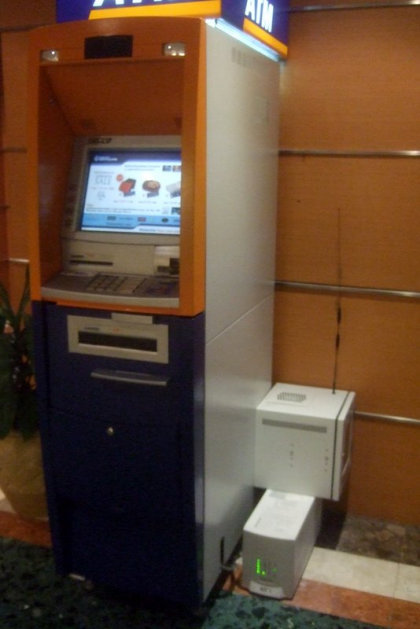
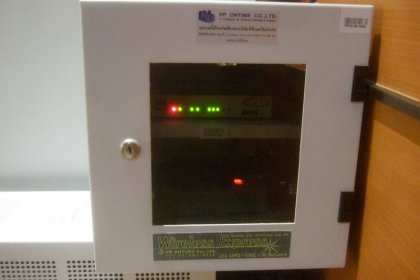

There's also ADM (Automatic Deposit Machine) where you can deposit cash to your bank account or transfer to others. The ADM machines stand outdoor are most vulnerable, especially when they open up the machine for maintenance (repair or simply when the machine is full) with lots of cash inside the machine (they are slided out from front). Usually, such operation required 2 or 3 person, one doing the maintenance and one as guard. Sometime I see third person when they need some kind of authorization. The cash stored in the metal boxes inside the machine.


Thursday, March 19, 2009

How antivirus software and System Restore work together

System RestoreImage via Wikipedia

How antivirus software and System Restore work together

a microsoft KB article

During a restoration, an active antivirus program scans for infected files. If the antivirus program detects any infected files, the antivirus program tries to modify, move, or delete the infected files. If the antivirus program successfully cleans the infected files, System Restore restores the cleaned files. However, if the antivirus software cannot clean a file, the antivirus software deletes or quarantines the file. As a result, the restoration does not work because these actions to the file cause an inconsistent restoration state. As a result, System Restore reverts to the state immediately before the restoration.


Reblog this post [with Zemanta]

Friday, February 13, 2009

มาดูกัน ตั้ง password แบบไหนแข็งแรง ไม่โดนแหก (hack)

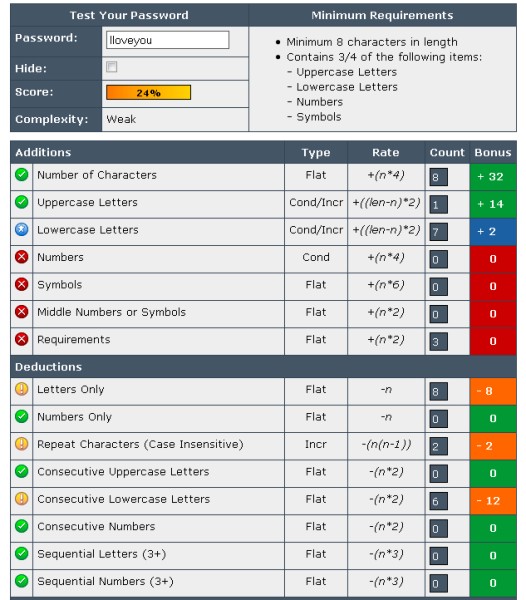
ตามที่เสนอ 2 โพสที่แล้ว เรื่อง password เราลองใช้งาน Password Meter และ Password Checker ของ Microsoft ดูแล้ว Password Meter ดูจะให้ info มากกว่า และมีวิธีให้คะแนนที่เข้าใจได้ มาดูผลกันดีกว่า

อันแรก Iloveyou ได้มาแค่ 24% weak


มาลอง ILoveYou ดูบ้าง เพิ่ม upper case ของแต่ละคำ
ได้คะแนนเพิ่มมาเป็น 28% ยัง weak อยู่


เอ้า มาลองเว้นวรรคดูดิ
เฮ่ย ได้มาเป็น 42% Good แล้ว


ไหนๆ ลองต่อดิ๊ เอาคำเดิม แต่ทำไงให้แข็งแรง ไม่แตกปลาย เมื่อโดน crack
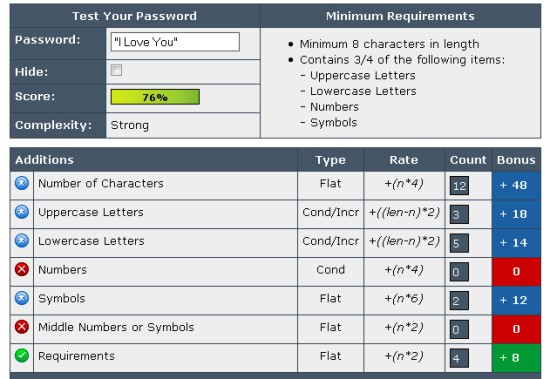
เอางี้ ใส่เครื่องหมายคำพูดคร่อมเลย "I Love You"
ได้มาเลย 76% Strong


ยังงี้ก็ยังจำง่าย แถมแข็งแรงพอสมควรสำหรับคนธรรมดา ที่ไม่ใช่ hacker หรือ cracker แต่เปลี่ยน I Love You เป็นคำอื่นเฉพาะตัวคุณนะ
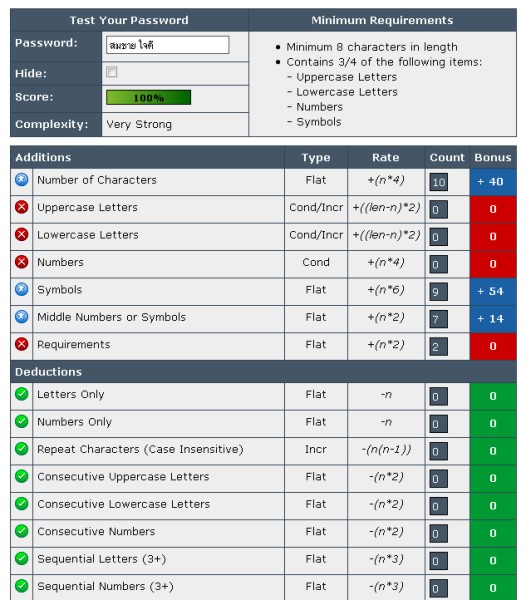
มาลองดูกันต่อดีกว่า ด้วยภาษาไทย
สมชาย ใจดี ได้ 96% very strong
แต่ถ้าเป็นชื่อนามสกุลคุณ คนที่รู้จักคุณคงแหก (hack)เข้าได้ ตั้งแต่ลองครั้งแรกแล้ว สรุปว่า ไม่ดี


ลองใหม่ เอาแบบทันยุคสมัย แบบเด็กตีกัน
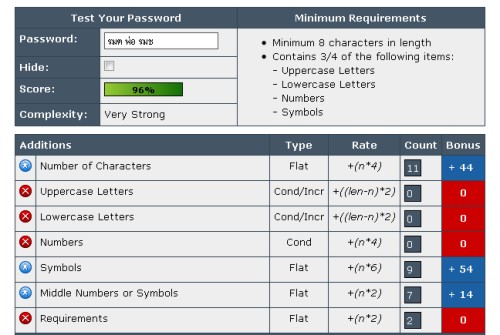
รมต พ่อ รมช
ได้ไปถึง 96% very strong
แบบนี้ก็สบายสิครับ เอามาแอพพลายได้สบาย
เช่น อภิสิด พ่อ สมหญิง อะไรเงี้ย อิอิ


พอแล้วเนาะ เอาเป็นว่า เลือก password ที่มีทั้ง

uppercase TH
lowercase ai
number 52
special character _/|\_

ด้วยนะ อย่าให้ง่ายเกินไป อย่าให้ยากเกินไป จำไม่ได้ จนต้องจดแปะไว้ข้างจอ ไอ้แบบนั้นน่ะไม่เอา เปลี่ยนเป็นแปะไว้ใต้คีย์บอร์ด ดีกว่า อิอิ ไม่ค่อยมีใครมาพลิกดูหรอก ล้อเล่นน่ะ
อ้อ แล้วก็เปลี่ยน password เป็นช่วงๆ
อย่าใช้ password เหมือนกันทุกอย่าง เช่น ATM มีกี่ใบก็รหัสเดียวกัน

สุดท้าย อย่าซีเรียสมาก คนมันจะ hack ยังไงมันก็ hack ได้น่ะแหละ ขึ้นอยู่กับว่าจะใช้เวลาแค่ไหนเท่านั้นเอง...นะคร๊าบบบ...

Wednesday, February 11, 2009

มหกรรมปิดถนน วันโอบามาสาบานตัว - Google Maps

ถ้ายังจำกันได้ วันที่โอบามา ประธานาธิบดีสหรัฐคนที่ 44 เข้าสาบานตนที่วอชิงตัน ดีซี วันนั้นการจัดการรักษาความปลอดภัยเข้มข้นมากเป็นพิเศษ Google Maps เสนอแผนที่ของดีซี ในวันนั้น ให้เห็นถนน และสะพานต่างๆ ที่ปิดเพื่อความปลอดภัย การรับมือผู้คนเป็นล้านๆ แบบนี้ที่เรียกว่าเป็นมืออาชีพของแท้ คงไม่ต้องบอกเลยว่าเบื้องหลัง security นี้จะมีแผนรองรับสถานการณ์ต่างๆอยู่มากแค่ไหน ตำรวจไทยน่าจะเอาเป็นเยี่ยงอย่าง และเป็น professional แบบไม่เข้าข้างการเมือง ให้ได้อย่างเค้า ซักนิดก็ยังดี...เนาะ

ภาพถ่ายดาวเทียม ช่วงนาทีประวัติศาสตร์ จาก GeoEye

$

แผนที่ถนนที่ถูกปิด จาก Google Maps
Google Maps

ตั้งรหัสผ่าน"1234" สุดฮิตถูกแฮกข้อมูลง่ายมากที่สุด

ผลการศึกษาวิเคราะห์พาสเวิร์ดหรือรหัสผ่าน จำนวน 28,000 พาสเวิร์ดที่ถูกขโมยในช่วงเวลาไม่นานมานี้จากเว็บไซต์ยอดนิยมในสหรัฐพบว่า ประชาชนส่วนใหญ่นิยมใช้คำ หรือตัวเลขง่าย ๆ มาเป็นรหัสผ่านทางอินเทอร์เน็ต โดยพบว่า ร้อยละ 16 จะใช้ชื่อแรกของตัวเอง หรือชื่อของลูก ๆ ขณะที่ร้อยละ 14 จะใช้ตัวเลขง่าย ๆ เช่นเลขเรียงกัน อย่าง 1234 หรือ 12345678 หรือตัวอักษรที่เรียงกันบนคีย์บอร์ด เช่น QWERTY เป็นต้น

ขณะที่ร้อยละ 5 ตั้งรหัสผ่านด้วยการใช้ชื่อรายการโทรทัศน์ หรือชื่อดาราที่ชื่นชอบ เช่น Hannah ซึ่งมาจากชื่อนักร้อง Hanna Montana นอกจากนี้ยังมีชื่อ Pokemon Matrix และ Ironman รวมทั้งชื่ออื่น ๆ ผลสำรวจพบด้วยว่าร้อยละ 4 ใช้คำว่า password หรือ password1 มาเป็นรหัสผ่านโดยตรง ขณะที่ร้อยละ 3 ใช้ข้อความที่บ่งบอกทัศนคติ เช่น I don′t care Whatever Yes และ NO รวมทั้งใช้ข้อความ Iloveyou และ Ihateyou

 รอเบิร์ต แกรมฮ์ เจ้าหน้าที่บริษัทเออแรตตา ซีเคียวริตี้ ผู้วิเคราะห์ข้อมูลและเผยแพร่ผลการศึกษา แนะนำว่าการกำหนดรหัสผ่านที่ปลอดภัยนั้น ควรจะกำหนดให้มีความยาวเกินกว่า 8 อักษร และอย่างน้อยควรจะประกอบด้วย อักษรตัวพิมพ์ใหญ่ 1 ตัว และสัญลักษณ์ 1 ตัว (special character) รวมอยู่ด้วย

matichon online

ของแถม

เช็คว่า password ของคุณที่ใช้อยู่ ปลอดภัยแค่ไหน

Microsoft password strength checker

Password meter (web) หรือ free downloadble GNU software

คำเตือน อย่าไว้ใจเว็บที่เช็ค โดยที่คุณต้อง submit password ของคุณ และเช็คจากไซท์ที่เชื่อถือได้เท่านั้น

Macross Variable Fighters

https://youtu.be/ZByNgWBYhUY